 Factory digital twin & production simulation

Model a production line, simulate it and find the bottleneck — free, in your browser.
Twinworks is a factory digital twin that runs entirely in your browser. Draw a production line on a floor plan with sources, buffers, machines, assembly stations, conveyors, quality checks and operators, then watch a seeded discrete-event simulation animate it in 2D or 3D. Live KPIs show throughput, lead time, WIP with a Little’s-law check, OEE per machine, state Gantt charts and the bottleneck, and the scenario manager, parameter sweeps and cost model turn it into a what-if laboratory.

Screenshots
 Floor-plan editor with palette, object tree and properties inspector
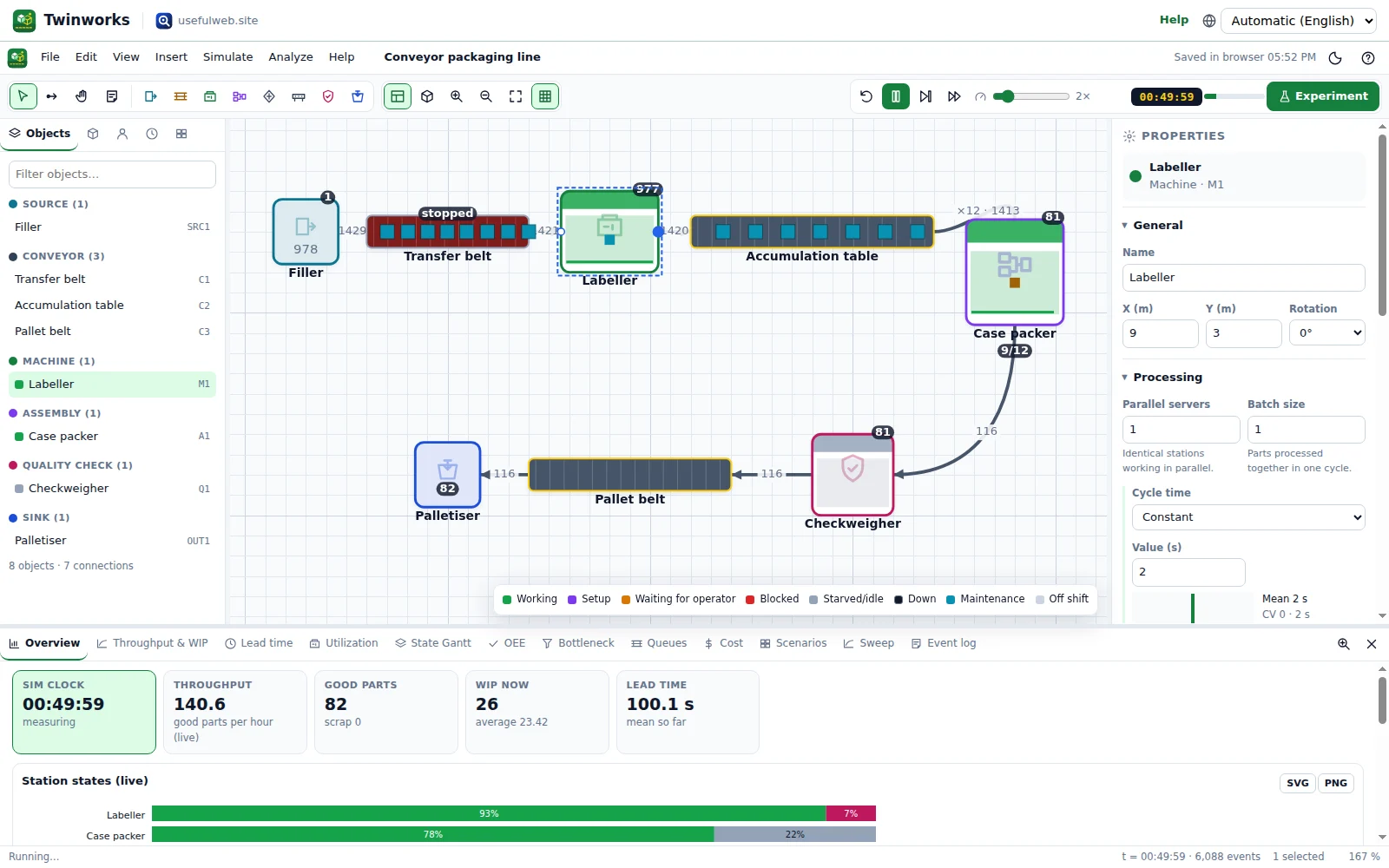 Animated simulation with live KPIs
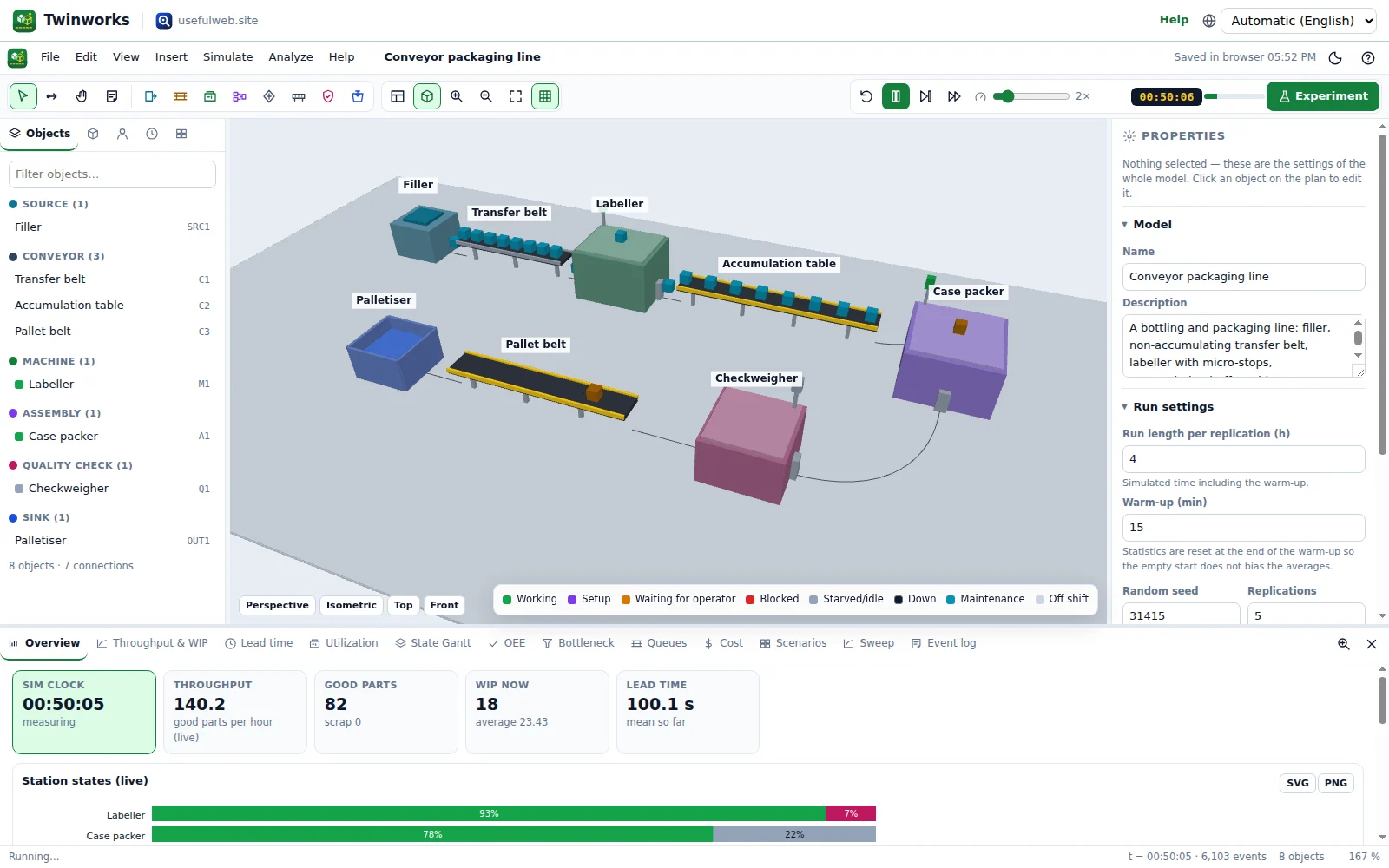 3D view of the shop floor
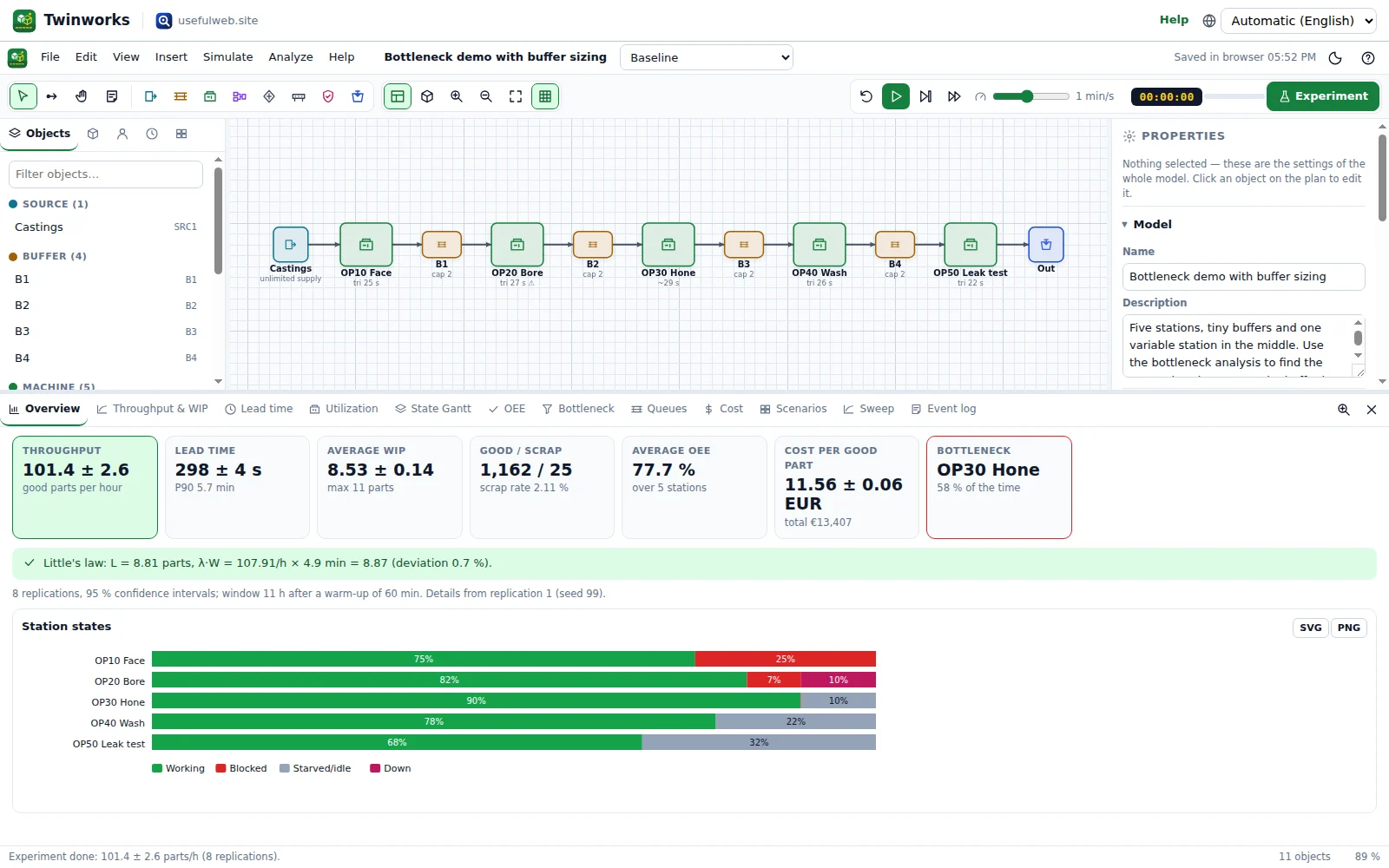 KPI dashboard with confidence intervals
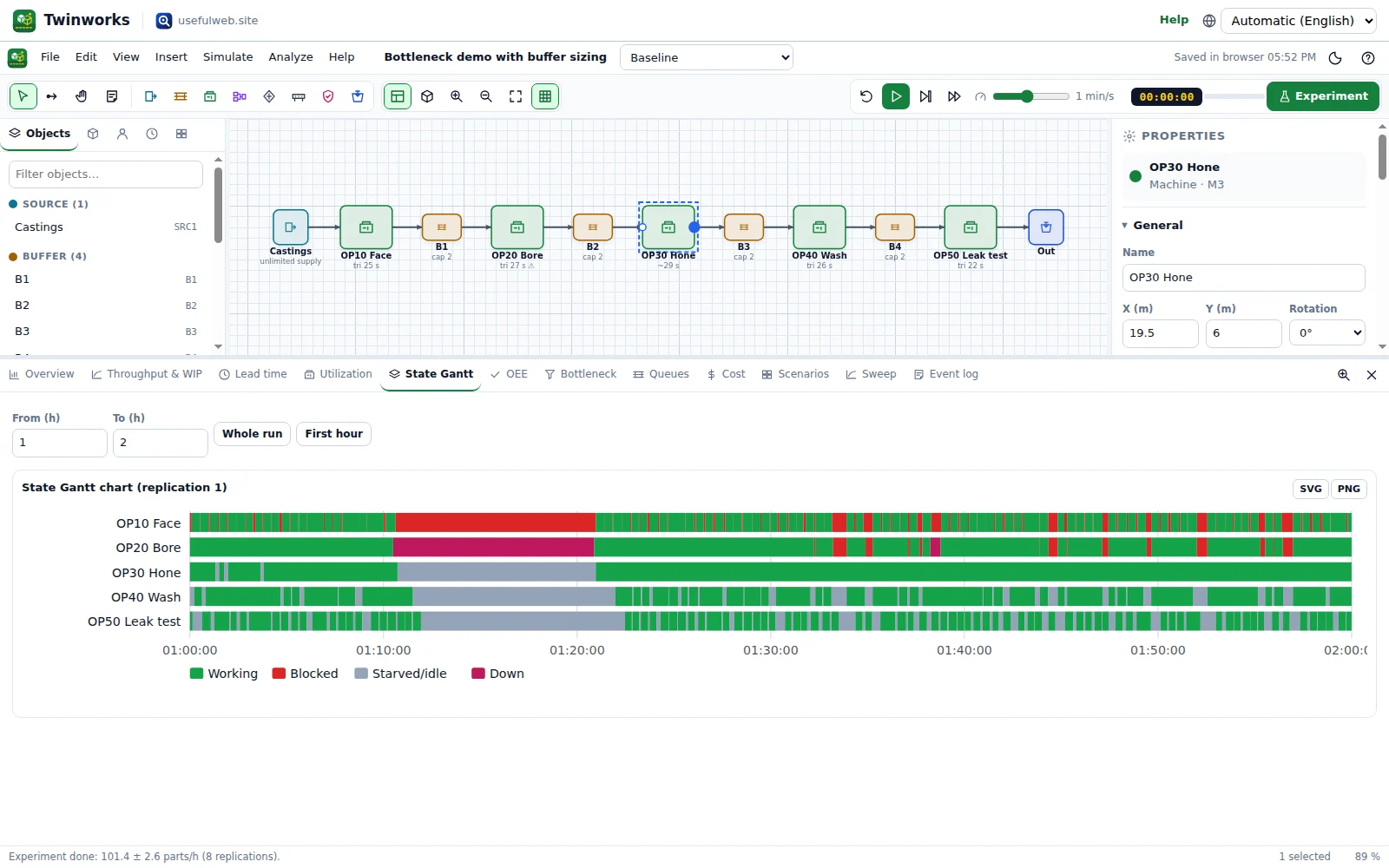 State Gantt chart per machine
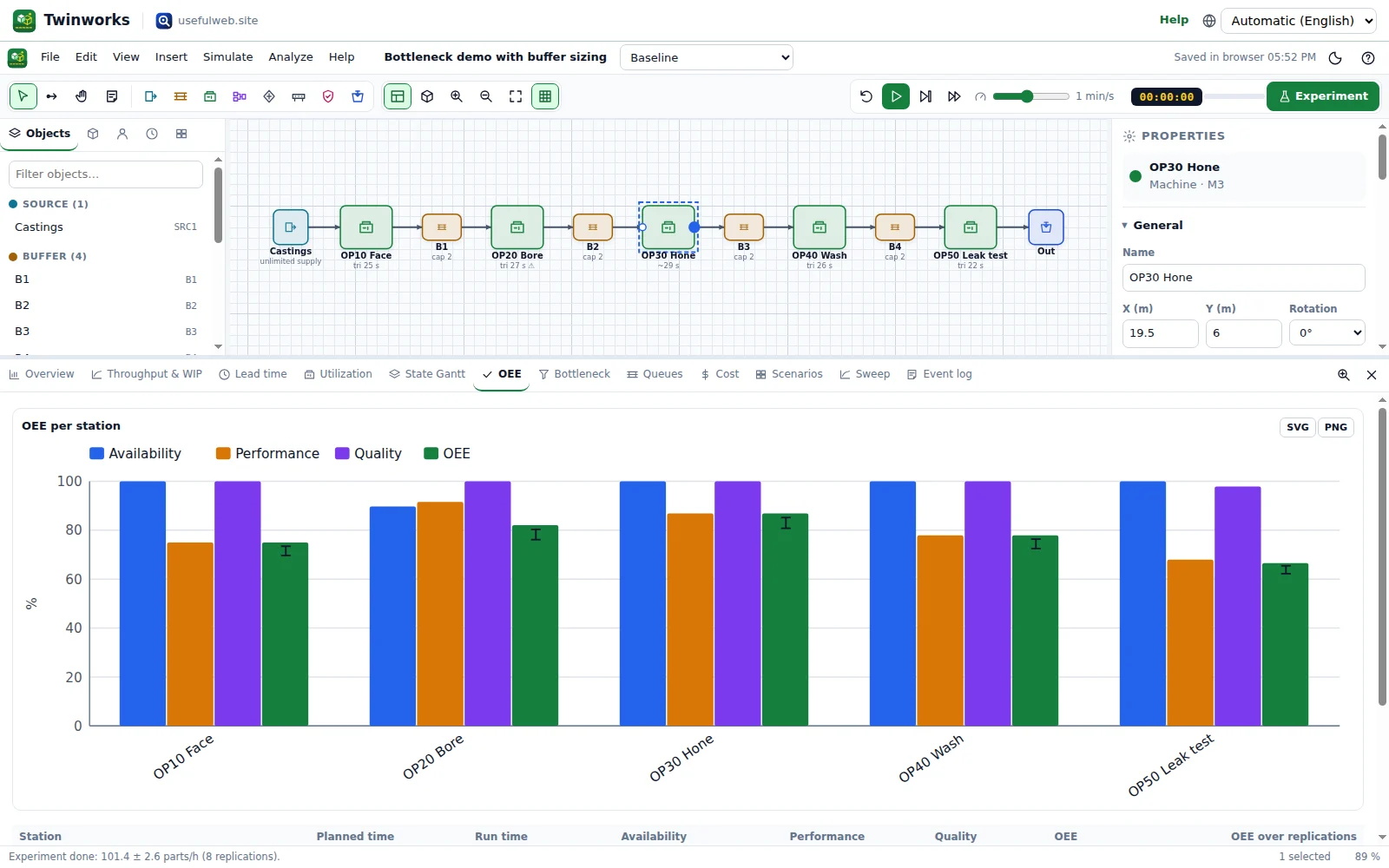 OEE = availability × performance × quality
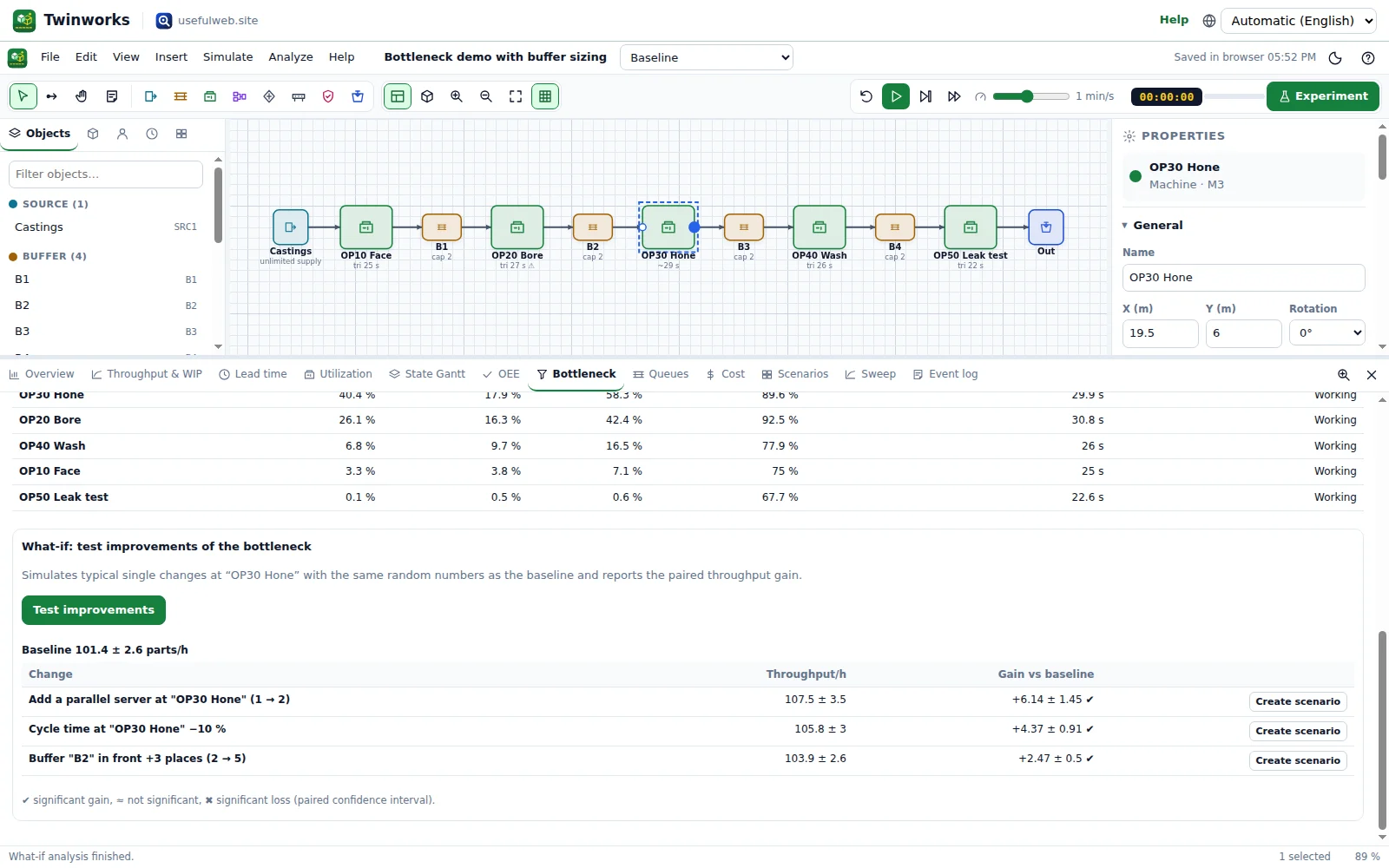 Bottleneck detection with recommendations
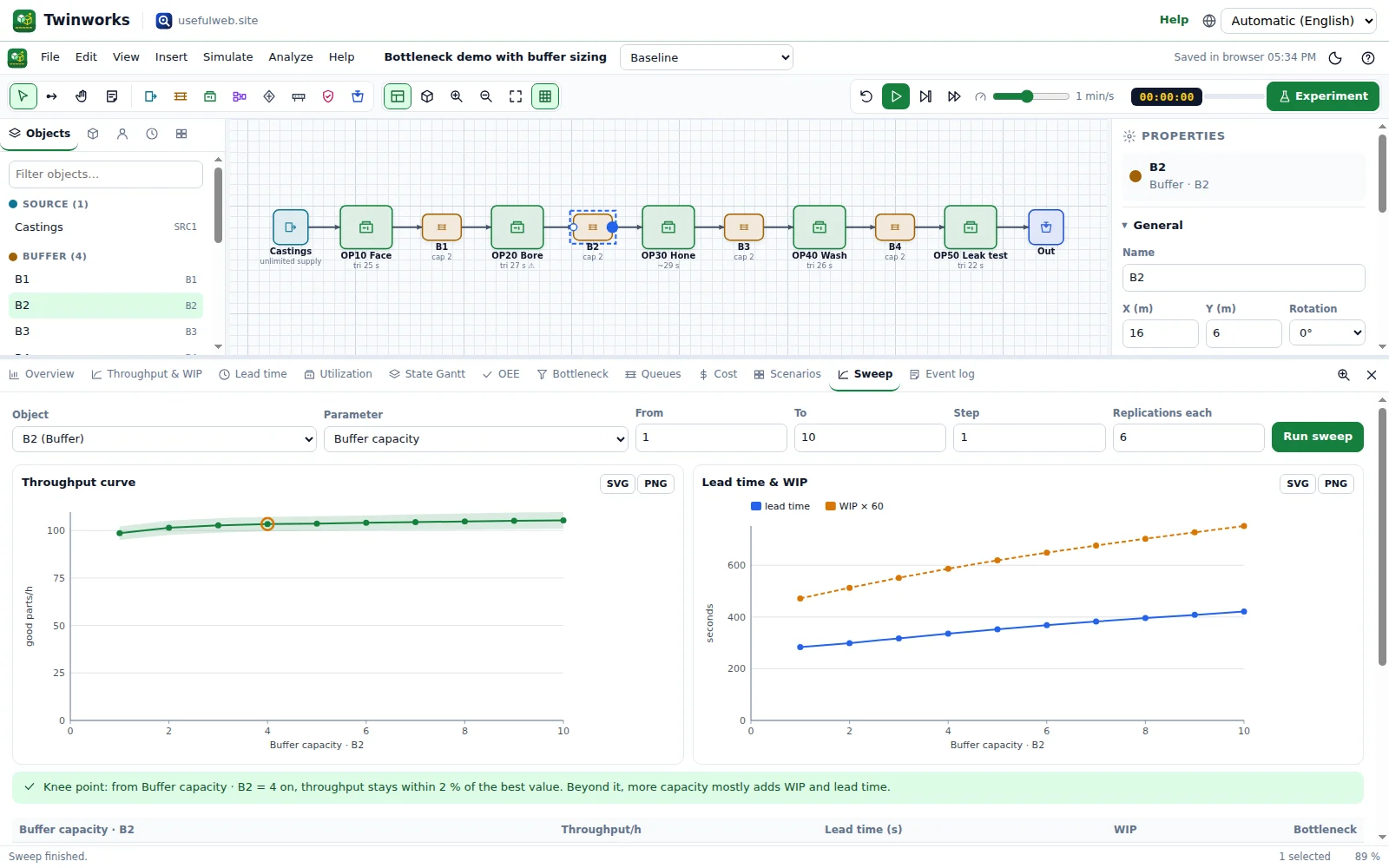 Buffer sweep with knee point
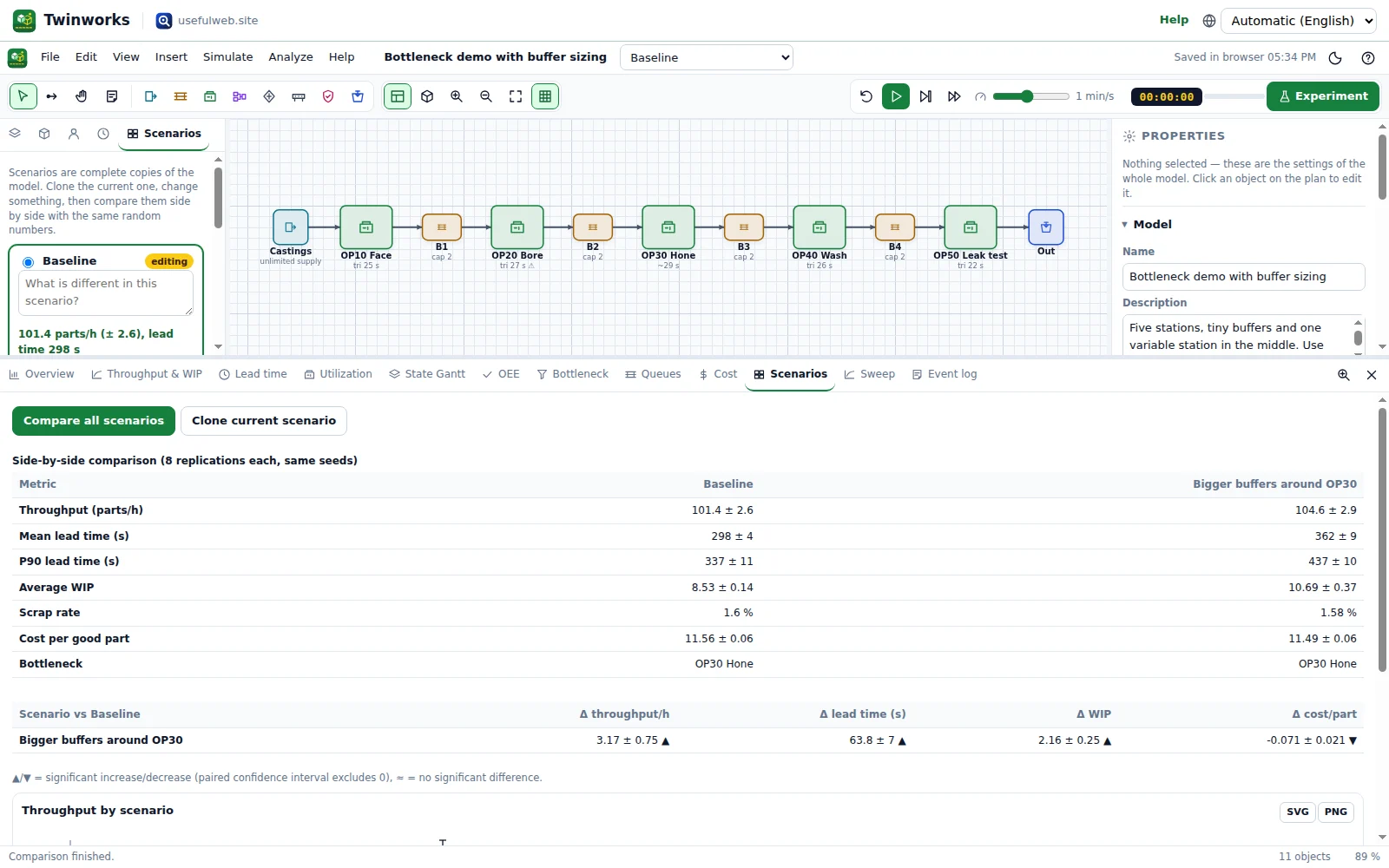 What-if scenarios compared side by side
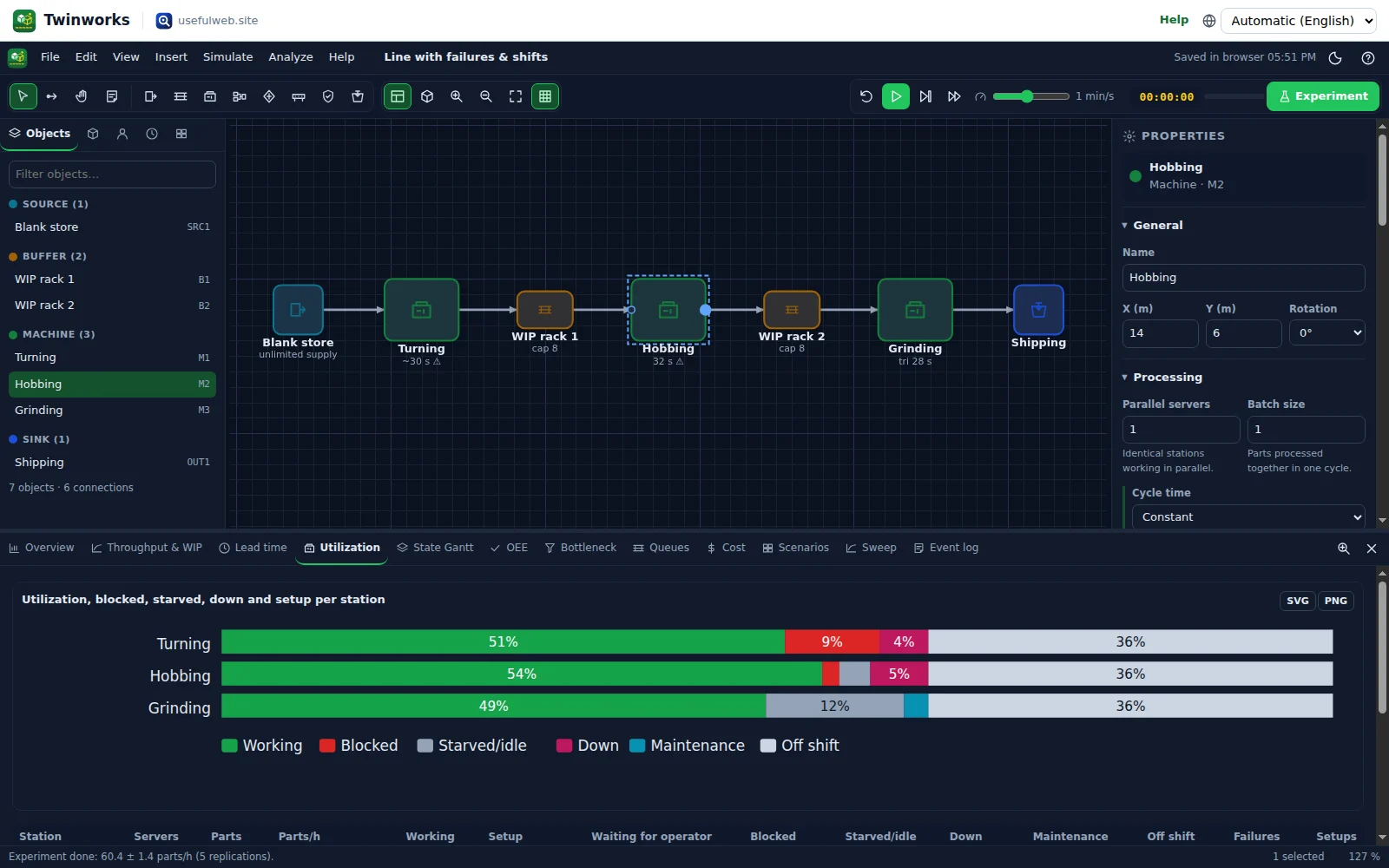 Dark theme: utilization, blocking, downtime and off-shift time per station
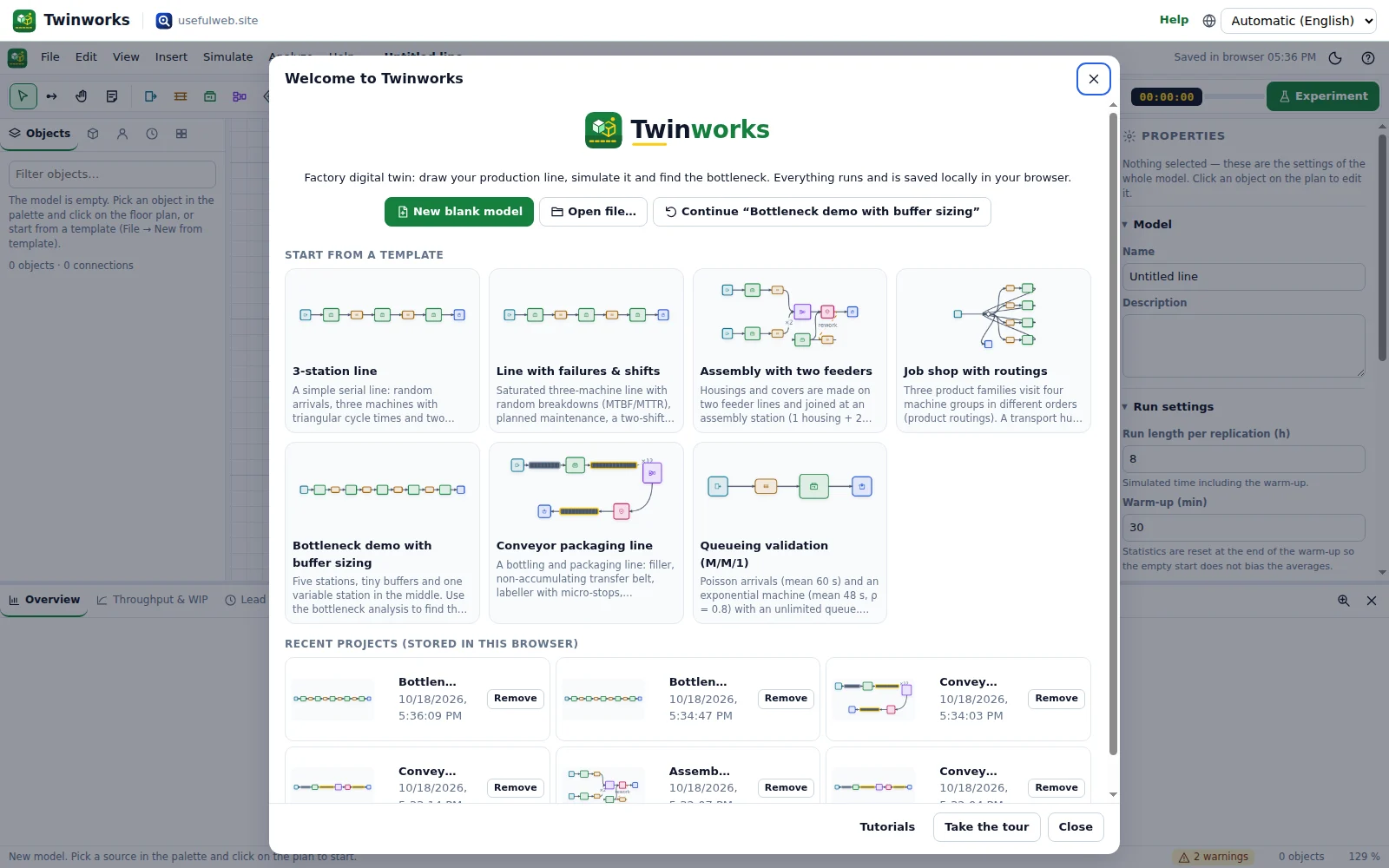 Start screen with templates and recent projects
Features
Floor-plan editor
Drag sources, buffers, machines, assembly, splits, conveyors, quality checks and sinks onto a metre grid, connect them with arrows, snap, align, copy and undo.
2D plan and 3D view
Switch between the technical plan and a WebGL 3D/isometric view of the shop floor with machines coloured by state and parts moving along the line.
Own simulation engine
Seeded discrete-event simulation with a binary-heap event calendar, warm-up, replications and Student-t confidence intervals — the same code powers the API.
Realistic randomness
Constant, uniform, triangular, truncated normal, exponential and lognormal cycle times, arrivals by interval, schedule, batch or unlimited supply.
Failures & maintenance
Breakdowns with MTBF/MTTR distributions on calendar or operating time, planned maintenance, setups on product change and batch processing.
Operators & shifts
Shared operator pools, shift calendars with breaks and weekends; machines wait for operators and stop at shift end.
Conveyors & routing
Accumulating and non-accumulating conveyors with length, speed and pitch; routing by percentage, round robin, shortest queue, product type or product routing.
Assembly, quality & rework
Kit assembly from several feeders, inspection with scrap and rework loops, product variants with colours and job-shop routings.
Live KPI dashboard
Throughput per hour, lead-time histogram, WIP over time with Little’s law, queue lengths and utilization/blocked/starved/down bars while the animation runs.
OEE & state Gantt
Availability × performance × quality per machine and a state Gantt chart that shows exactly when each station worked, waited or broke down.
Bottleneck detection
Active-period method with sole and shifting bottlenecks plus utilization ranking, with concrete recommendations and what-if gains.
Scenarios side by side
Clone the model, change it and compare scenarios with paired confidence intervals on the same random numbers.
Parameter sweeps
Sweep a buffer size, server count, cycle time, MTTR or crew size and see the throughput curve with its knee point.
Cost model
Machine hourly rates, labour, material, scrap and overhead roll up to a cost per good part and profit per scenario.
Reports & exports
Printable KPI report, CSV event log and time series, JSON model, PNG/SVG of the layout and every chart — all generated locally.
API & MCP tools
Simulate, rank bottlenecks, balance lines, sweep buffers and check queueing formulas from scripts or AI agents with the same engine.


Templates
Start from a ready-made project and change it to fit.
3-station line
A simple serial line: random arrivals, three machines with triangular cycle times and two small buffers. The classic starting point.
Line with failures & shifts
Saturated three-machine line with random breakdowns (MTBF/MTTR), planned maintenance, a two-shift calendar with breaks and an operator pool. Shows availability losses in OEE.
Assembly with two feeders
Housings and covers are made on two feeder lines and joined at an assembly station (1 housing + 2 covers), followed by an end-of-line test with scrap and a rework loop. Assembly needs an operator from a shared pool.
Job shop with routings
Three product families visit four machine groups in different orders (product routings). A transport hub dispatches each part to the next step of its routing; the mill needs a 2.5-minute setup whenever the product family changes.
Bottleneck demo with buffer sizing
Five stations, tiny buffers and one variable station in the middle. Use the bottleneck analysis to find the constraint, then sweep the buffer in front of it from 1 to 10 to see where more space stops paying off.
Conveyor packaging line
A bottling and packaging line: filler, non-accumulating transfer belt, labeller with micro-stops, accumulating buffer table, case packer (12 bottles → 1 case), checkweigher and a pallet conveyor. Shows how accumulation decouples a failing labeller from the packer.
Queueing validation (M/M/1)
Poisson arrivals (mean 60 s) and an exponential machine (mean 48 s, ρ = 0.8) with an unlimited queue. Theory: mean wait in queue Wq = ρ/(μ−λ) = 192 s, Lq = 3.2. Run 20 long replications and compare the confidence interval.
For AI agents
Twinworks runs on a deterministic engine. The same functions are available as tools with a JSON API and MCP, so scripts and AI agents get exactly the results the app shows.
- Twinworks Factory Simulation – Simulate a production line: throughput, lead time, WIP, OEE and the bottleneck, with CIs.
Tool page ·POST https://twinworks.usefulweb.site/api/v1/tools/twinworks-simulate/calculate· MCPtwinworks_simulate - Twinworks Bottleneck Analysis – Find the constraint of a production line and test fixes: ranked bottlenecks with what-if gains.
Tool page ·POST https://twinworks.usefulweb.site/api/v1/tools/twinworks-bottleneck-analysis/calculate· MCPtwinworks_bottleneck_analysis - Twinworks Line Balancing – Assign assembly tasks to stations for a takt time: efficiency, balance delay and smoothness index.
Tool page ·POST https://twinworks.usefulweb.site/api/v1/tools/twinworks-line-balance/calculate· MCPtwinworks_line_balance - Twinworks Buffer & Parameter Sweep – Sweep a buffer size (or any parameter) and get the throughput curve with confidence intervals.
Tool page ·POST https://twinworks.usefulweb.site/api/v1/tools/twinworks-buffer-sweep/calculate· MCPtwinworks_buffer_sweep - Twinworks Queueing Check – M/M/1, M/M/c, M/D/1, M/G/1 and Kingman waiting times — optionally verified by simulation.
Tool page ·POST https://twinworks.usefulweb.site/api/v1/tools/twinworks-queue-formulas/calculate· MCPtwinworks_queue_formulas
- MCP endpoint (Streamable HTTP):
https://twinworks.usefulweb.site/mcp - Project file format (JSON Schema): https://twinworks.usefulweb.site/project.schema.json
- OpenAPI description: /openapi.json · llms.txt · API & MCP
Build a project through the API, then open it in the app with a link to https://twinworks.usefulweb.site/app#project=<base64url JSON>.
Import & export
Import
- Twinworks project (.twinworks.json)
- Twinworks model JSON
- Project link (#project=…)
Export
- Twinworks project (.twinworks.json)
- CSV event log
- CSV time series
- CSV station KPIs
- PNG and SVG of the layout
- PNG and SVG of charts
- Printable KPI report (PDF via print)
Keyboard shortcuts
| Keys | Action |
|---|---|
| V | Select tool |
| C | Connect tool |
| 1 … 8 | Place source, buffer, machine, assembly, split, conveyor, quality check, sink |
| Space | Play / pause simulation |
| . | Single step (next event) |
| Shift + F | Fast-forward to the end |
| Ctrl + R | Run experiment (replications) |
| Ctrl + Z / Ctrl + Y | Undo / redo |
| Ctrl + C / Ctrl + V / Ctrl + D | Copy / paste / duplicate |
| Delete | Delete selection |
| Arrow keys | Nudge selection (Shift = 1 m) |
| R | Rotate selection 90° |
| F | Zoom to fit |
| G | Toggle snap to grid |
| Tab | Switch 2D plan / 3D view |
| Ctrl + S | Save project file |
| Ctrl + O | Open project file |
| ? | Keyboard shortcuts |
Frequently asked questions
Is Twinworks really free?
Yes. Twinworks runs in your browser; projects are stored locally in IndexedDB and as files you download. There is no account and nothing is uploaded unless you call the API yourself.
How accurate is the simulation?
The engine is validated against queueing theory: M/M/1 and M/M/c waiting times fall inside the simulated confidence intervals, a deterministic line produces exactly 1 ÷ bottleneck cycle time, and Little’s law holds within a few percent in steady state. The accuracy of your model depends on your input data.
Why do I need replications and a warm-up?
A single random run is one sample. Replications with different seeds give a confidence interval for each KPI, and the warm-up removes the empty-line start so averages describe steady operation.
How is the bottleneck detected?
With the active-period method: whichever station has been working (or under repair, in setup, waiting for an operator) without interruption the longest is the bottleneck at that moment. Overlaps between successive bottlenecks are shifting bottlenecks. Utilization is shown as a second indicator.
How is OEE calculated?
Availability = run time ÷ planned time (breakdowns and setups are losses, shift breaks and planned maintenance are not planned time), performance = ideal cycle time × parts ÷ run time, quality = good ÷ processed parts. OEE is their product.
Can an AI agent build and run a model?
Yes. The project format is documented as a JSON schema; the twinworks-simulate, twinworks-bottleneck-analysis, twinworks-buffer-sweep, twinworks-line-balance and twinworks-queue-formulas tools are available via the JSON API and MCP, and results contain an “Open in Twinworks” link.
Can I import data from my MES or ERP?
Models are plain JSON, so a script can generate them from your data. Direct connectors to MES/ERP systems are not included.
Limitations
What Twinworks does not do (yet):
- Discrete parts only: no continuous flow (liquids, bulk material) or fluid tanks.
- Transport between objects is instantaneous unless you model it as a conveyor; there are no AGVs, forklifts or path finding.
- Operators are pooled resources without walking times, skills matrices or individual schedules.
- Conveyors use a slot model (length ÷ pitch) rather than exact physics; merges and curves are not modelled geometrically.
- The 3D view is a schematic visualisation, not CAD; no import of 3D models or DWG floor plans.
- No optimisation solver: sweeps change one parameter at a time.
- API calls are limited to roughly 40 million events per request; long studies run best in the app.
Tutorials
Learn Twinworks step by step.
- Your first production line in 5 minutesPlace a source, a buffer, a machine and a sink, connect them, press play and read throughput, lead time and the bottleneck. No account, nothing to install.Beginner 5 min
- Failures, shifts and operatorsMake the model realistic with breakdowns (MTBF/MTTR), planned maintenance, setups on product change, shared operators and a two-shift calendar with breaks.Intermediate 12 min
- Find the bottleneckUse the active-period method, utilization, the state Gantt chart and OEE to find what really limits your line — and test fixes with the what-if analysis before spending money.Intermediate 10 min
- Scenarios and buffer sweepsClone your model into what-if scenarios, change them, compare them side by side with paired confidence intervals, and sweep a buffer size to find the knee of the throughput curve.Intermediate 12 min
- Assembly, routings and qualityJoin parts from two feeder lines at an assembly station, add an end-of-line test with scrap and a rework loop, and model a job shop where each product family follows its own routing.Advanced 15 min
- Line balancing and cost per partDistribute assembly tasks over stations for a takt time with the ranked positional weight method, turn the result into a simulated line, and read the cost per good part.Intermediate 10 min
- Automate with the API / MCPRun the Twinworks engine from scripts and AI agents — simulate a model, rank bottlenecks, sweep a buffer, balance a line and check queueing formulas with real JSON requests and responses.Advanced 15 min
Ready to try it?
Other premium apps
-

Kerfwise
Cabinet & furniture CAD
Design cabinets and furniture, get cut lists, optimised sheet layouts, costs and drawings.
-

Kinetica
Robot motion studio
Simulate robot arms in your browser: kinematics, trajectories, collisions, program export.
-

Threadsmith
Embroidery digitizing studio
Draw or import artwork, turn it into real stitches, and export DST/EXP for your machine.
-

Ohmforge
Virtual electronics workbench
Draw a circuit, switch it on, and measure it with real-feeling bench instruments.