Tutorial 7 of 7
Automate with the API / MCP
Advanced 15 min
Run the Twinworks engine from scripts and AI agents — simulate a model, rank bottlenecks, sweep a buffer, balance a line and check queueing formulas with real JSON requests and responses.
The simulation engine in the workspace is the same TypeScript code that powers five tools on the usefulweb API and MCP server. Results are deterministic: the same model and seed always give the same numbers, in the browser and on the server.
| Tool id (REST) | MCP name | What it does |
|---|---|---|
twinworks-simulate | twinworks_simulate | Model + run length + seed + replications → KPIs with confidence intervals, per-station stats, bottleneck, cost |
twinworks-bottleneck-analysis | twinworks_bottleneck_analysis | Ranked bottlenecks (active-period method) + what-if gains + recommendations |
twinworks-buffer-sweep | twinworks_buffer_sweep | Sweep a buffer size (or another parameter) → throughput curve and knee point |
twinworks-line-balance | twinworks_line_balance | Tasks + precedence + takt → station assignment, efficiency, smoothness index |
twinworks-queue-formulas | twinworks_queue_formulas | M/M/1, M/M/c, M/D/1, M/G/1, Kingman — optionally verified by simulation |
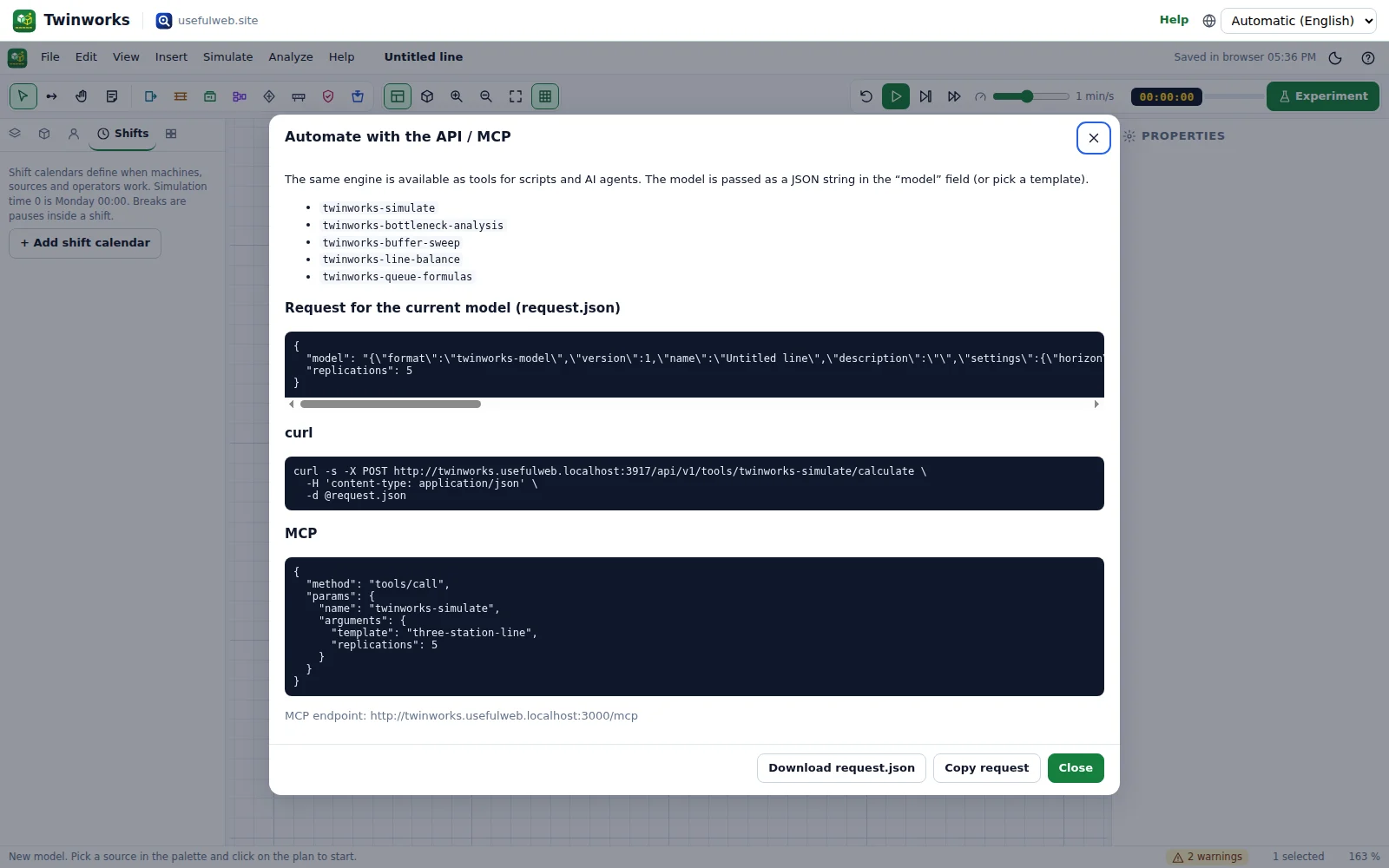
In the workspace, Help → Automate with the API / MCP shows ready-to-copy requests for your current model.
1. Simulate a template
Every model tool accepts either a template id or a model — the JSON from File → Export → Model JSON (active scenario), passed as a string.
curl -s -X POST https://twinworks.usefulweb.site/api/v1/tools/twinworks-simulate/calculate \
  -H 'content-type: application/json' \
  -d '{"template":"three-station-line","horizonHours":8,"replications":5,"seed":42}'
Response (shortened):
{
  "summary": "3-station line: 64.1 ± 3.4 good parts/h (95 % CI, 5 replications), mean lead time 304 s, WIP 5.53; bottleneck: Mill.",
  "result": {
    "replications": 5,
    "seeds": [42, 3029642774, 2605890936, 2032093786, 1137000544],
    "throughputPerHour": { "mean": 64.1333, "lo": 60.7384, "hi": 67.5282, "halfWidth": 3.3949, "n": 5 },
    "little": { "L": 6.8785, "lambdaPerHour": 66.6667, "W": 369.285, "lambdaW": 6.8386, "relError": 0.00581, "ok": true },
    "stations": [
      { "id": "M2", "name": "Mill", "utilization": 0.9126,
        "states": { "busy": 0.9126, "setup": 0, "waitop": 0, "blocked": 0, "idle": 0.0874, "down": 0, "maint": 0, "off": 0 },
        "availability": 1, "performance": 0.903, "quality": 1, "oee": 0.903 }
    ],
    "bottleneck": { "primary": "M2", "ranking": [ { "id": "M2", "name": "Mill", "sole": 0.8252, "shifting": 0.0606, "total": 0.8858 } ] },
    "openInAppUrl": "https://twinworks.usefulweb.site/app#project=…"
  }
}
seeds lists the seed of every replication, so any run can be reproduced exactly. little compares the measured WIP with throughput × lead time of the first replication (Little's law) — a quick sanity check of the model. openInAppUrl opens the model in the workspace.
2. Your own model, checked by hand
A deterministic two-machine line: unlimited supply, M1 = 30 s, a 3-place buffer, M2 = 40 s. Save it as two-machines.json:
{
  "name": "Two machines",
  "settings": { "horizon": 7200, "warmup": 600 },
  "nodes": [
    { "id": "S", "type": "source", "arrival": "saturated" },
    { "id": "M1", "type": "machine", "cycle": { "type": "constant", "value": 30 } },
    { "id": "B", "type": "buffer", "capacity": 3 },
    { "id": "M2", "type": "machine", "cycle": { "type": "constant", "value": 40 } },
    { "id": "OUT", "type": "sink" }
  ],
  "links": [ { "from": "S", "to": "M1" }, { "from": "M1", "to": "B" }, { "from": "B", "to": "M2" }, { "from": "M2", "to": "OUT" } ]
}
The model field is text (the JSON as a string), so the file is embedded with jq:
jq -n --rawfile m two-machines.json '{model: $m, replications: 1}' |
  curl -s -X POST https://twinworks.usefulweb.site/api/v1/tools/twinworks-simulate/calculate \
       -H 'content-type: application/json' --data @-
Result: "summary": "Two machines: 90 good parts/h (single run), mean lead time 240 s, WIP 6; bottleneck: Machine M2."
That is exactly what theory says for a deterministic line: throughput = 1 / bottleneck cycle time = 3600 / 40 = 90 parts/h. M1 is busy 30/40 = 75 % and blocked the other 25 %, M2 is busy 100 %. Little's law holds exactly: L = λ·W = (90 / 3600 s) × 240 s = 6 parts in the system.
Distribution types: constant {value}, uniform {min,max}, triangular {min,mode,max}, normal {mean,sd} (truncated at 0), exponential {mean}, lognormal {mean,sd}. The full format is in /project.schema.json.
3. Rank bottlenecks and test fixes
curl -s -X POST https://twinworks.usefulweb.site/api/v1/tools/twinworks-bottleneck-analysis/calculate \
  -H 'content-type: application/json' \
  -d '{"template":"bottleneck-buffer-sizing","replications":3}'
{
"summary": "\"OP30 Hone\" is the main bottleneck (58.3% of the time; best tested fix: Add a parallel server at \"OP30 Hone\" (1 → 2), +7.85 parts/h).",
"result": {
"primary": "M3",
"ranking": [
{ "rank": 1, "id": "M3", "name": "OP30 Hone", "sole": 0.4043, "shifting": 0.1788, "total": 0.5831, "utilization": 0.8477 },
{ "rank": 2, "id": "M2", "name": "OP20 Bore", "sole": 0.2613, "shifting": 0.1628, "total": 0.4241, "utilization": 0.7929 }
],
"recommendations": [ "\"OP30 Hone\" is the bottleneck 58.3% of the time (40.4% sole, 17.9% shifting): …" ]
}
}4. Sweep a buffer
{ "template": "bottleneck-buffer-sizing", "target": "B2", "parameter": "capacity", "from": 1, "to": 8, "step": 1, "replications": 4 }POST it to /api/v1/tools/twinworks-buffer-sweep/calculate:
{
  "summary": "Throughput ranges from 99.6 to 105.8 parts/h over buffer capacity 1…8 at B2; knee point at 3.",
  "result": {
    "points": [
      { "value": 1, "throughput": { "mean": 99.5682, "lo": 95.1451, "hi": 103.9913 }, "wip": { "mean": 7.9107 }, "bottleneck": "M3" },
      { "value": 2, "throughput": { "mean": 102.4318, "lo": 97.7379, "hi": 107.1257 }, "wip": { "mean": 8.6199 }, "bottleneck": "M3" },
      { "value": 3, "throughput": { "mean": 103.7273, "lo": 99.2019, "hi": 108.2527 }, "wip": { "mean": 9.285 }, "bottleneck": "M3" }
    ]
  }
}
All sweep points use the same replication seeds, so the curve is smooth and the differences between points are meaningful.
5. Balance a line
{
  "tasks": [
    { "id": "A", "time": 60, "predecessors": "" },   { "id": "B", "time": 40, "predecessors": "A" },
    { "id": "C", "time": 55, "predecessors": "B" },  { "id": "D", "time": 50, "predecessors": "A" },
    { "id": "E", "time": 30, "predecessors": "D" },  { "id": "F", "time": 45, "predecessors": "D" },
    { "id": "G", "time": 20, "predecessors": "F" },  { "id": "H", "time": 35, "predecessors": "C,E,G" }
  ],
  "availableMinutes": 450, "demand": 270, "method": "best"
}
→ "4 stations for a takt time of 100 s (theoretical minimum 4), efficiency 83.8%, smoothness index 47.7 s." with the stations [A,B], [D,F], [C,E], [G,H]. The result also contains a ready-to-simulate model of the balanced line.
6. Check a queueing formula
{ "queue": "mm1", "arrivalsPerHour": 60, "serviceTime": 48, "verify": true, "replications": 10 }→ "M/M/1: utilization 80%, mean wait 192 s, mean queue 3.2; simulation confirms the result." The verification block holds the simulated mean wait 193.4 s with the 95 % interval [177.2, 209.6], which contains the exact 192 s.
7. Use it from an AI agent (MCP)
Add the MCP endpoint https://twinworks.usefulweb.site/mcp to your MCP client (Claude Desktop, Cursor, …). Tool names use underscores:
{
  "jsonrpc": "2.0", "id": 2, "method": "tools/call",
  "params": {
    "name": "twinworks_bottleneck_analysis",
    "arguments": { "template": "bottleneck-buffer-sizing", "replications": 3 }
  }
}
The response has the summary as text plus the full JSON in structuredContent. A good prompt: "Here is my line as Twinworks JSON. Find the bottleneck, then sweep the buffer in front of it from 1 to 8 and tell me the smallest size that gets 95 % of the gain."
Limits
A replication may need at most 6 million events. The API accepts up to 30 replications for twinworks-simulate and up to 20 per point for the analysis and sweep tools, with run lengths up to 2,400 hours. For bigger studies use the workspace (it runs in a Web Worker on your computer) or split the work into several calls.