Tutorial 7 van 12
Automatiseren met de API / MCP
Expert 15 min
Laat de Twinworks-engine draaien vanuit scripts en AI-agents: simuleer een model, rangschik bottlenecks, varieer en optimaliseer buffers, balanceer een lijn en controleer wachtrijformules met echte JSON-requests en -responses.
De simulatie-engine in de werkruimte is dezelfde TypeScript-code die zes tools op de usefulweb-API en MCP-server aandrijft. Een zevende tool, de Planner voor materiaaltransport, wordt behandeld in Gedeelde voertuigen, transportplanningen en modelcontroles. De resultaten zijn deterministisch: hetzelfde model met dezelfde seed geeft altijd dezelfde getallen, zowel in de app als op de server.
| Tool-id (REST) | MCP-naam | Wat het doet |
|---|---|---|
twinworks-simulate | twinworks_simulate | Model + looptijd + seed + replicaties → KPI's met betrouwbaarheidsintervallen, statistieken per station, bottleneck, kosten |
twinworks-bottleneck-analysis | twinworks_bottleneck_analysis | Gerangschikte bottlenecks (actieve-periodemethode) + wat-als-winst + aanbevelingen |
twinworks-buffer-sweep | twinworks_buffer_sweep | Varieer een buffergrootte (of een andere parameter) → doorzetcurve en knikpunt |
twinworks-buffer-allocation | twinworks_buffer_allocation | Verdeel een vast aantal bufferplaatsen voor maximale doorzet (greedy, common random numbers) |
twinworks-line-balance | twinworks_line_balance | Taken + volgorderelaties + takt → stationstoewijzing, efficiëntie, gladheidsindex |
twinworks-queue-formulas | twinworks_queue_formulas | M/M/1, M/M/c, M/D/1, M/G/1, Kingman, optioneel geverifieerd met een simulatie |
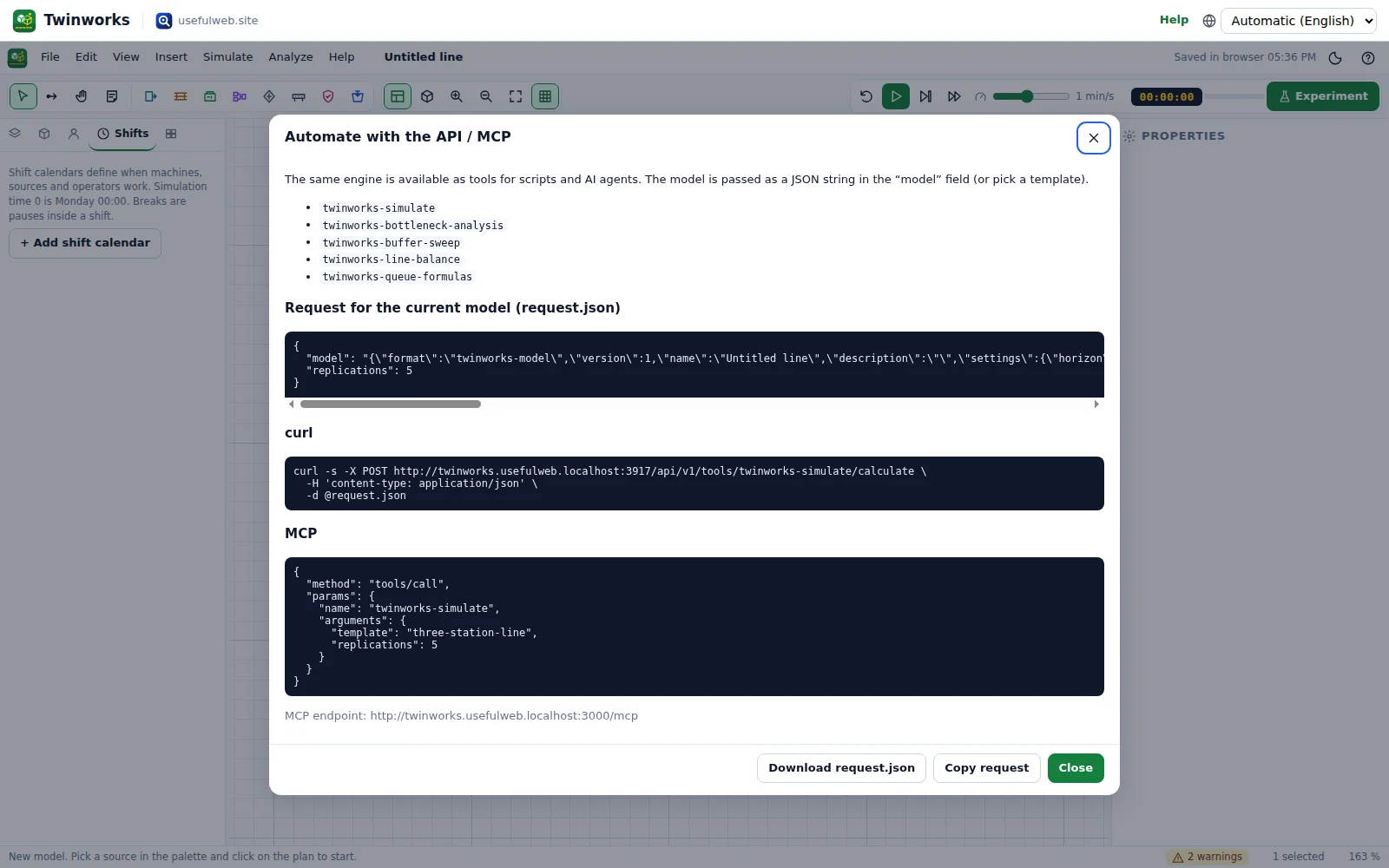
In de werkruimte vind je onder Help → Automatiseren met de API / MCP kant-en-klare requests voor je huidige model, klaar om te kopiëren.
1. Een sjabloon simuleren
Elke modeltool accepteert een template-id of een model. Dat laatste is de JSON uit Bestand → Exporteren → Model-JSON (actief scenario), doorgegeven als string.
curl -s -X POST https://twinworks.usefulweb.site/api/v1/tools/twinworks-simulate/calculate \
  -H 'content-type: application/json' \
  -d '{"template":"three-station-line","horizonHours":8,"replications":5,"seed":42}'
Response (ingekort):
{
  "summary": "3-station line: 64.1 ± 3.4 good parts/h (95 % CI, 5 replications), mean lead time 304 s, WIP 5.53; bottleneck: Mill.",
  "result": {
    "replications": 5,
    "seeds": [42, 3029642774, 2605890936, 2032093786, 1137000544],
    "throughputPerHour": { "mean": 64.1333, "lo": 60.7384, "hi": 67.5282, "halfWidth": 3.3949, "n": 5 },
    "little": { "L": 6.8785, "lambdaPerHour": 66.6667, "W": 369.285, "lambdaW": 6.8386, "relError": 0.00581, "ok": true },
    "stations": [
      { "id": "M2", "name": "Mill", "utilization": 0.9126,
        "states": { "busy": 0.9126, "setup": 0, "waitop": 0, "blocked": 0, "idle": 0.0874, "down": 0, "maint": 0, "off": 0 },
        "availability": 1, "performance": 0.903, "quality": 1, "oee": 0.903 }
    ],
    "bottleneck": { "primary": "M2", "ranking": [ { "id": "M2", "name": "Mill", "sole": 0.8252, "shifting": 0.0606, "total": 0.8858 } ] },
    "openInAppUrl": "https://twinworks.usefulweb.site/app#project=…"
  }
}
seeds bevat de seed van elke replicatie, zodat je elke run exact kunt reproduceren. little vergelijkt het gemeten onderhanden werk (WIP) met doorzet × doorlooptijd van de eerste replicatie (de wet van Little). Zo controleer je snel of het model klopt. openInAppUrl opent het model in de werkruimte.
2. Je eigen model, met de hand gecontroleerd
Een deterministische lijn met twee machines: onbeperkte aanvoer, M1 = 30 s, een buffer met 3 plaatsen, M2 = 40 s. Sla hem op als two-machines.json:
{
  "name": "Two machines",
  "settings": { "horizon": 7200, "warmup": 600 },
  "nodes": [
    { "id": "S", "type": "source", "arrival": "saturated" },
    { "id": "M1", "type": "machine", "cycle": { "type": "constant", "value": 30 } },
    { "id": "B", "type": "buffer", "capacity": 3 },
    { "id": "M2", "type": "machine", "cycle": { "type": "constant", "value": 40 } },
    { "id": "OUT", "type": "sink" }
  ],
  "links": [ { "from": "S", "to": "M1" }, { "from": "M1", "to": "B" }, { "from": "B", "to": "M2" }, { "from": "M2", "to": "OUT" } ]
}
Het veld model is tekst (de JSON als string), dus je sluit het bestand in met jq:
jq -n --rawfile m two-machines.json '{model: $m, replications: 1}' |
  curl -s -X POST https://twinworks.usefulweb.site/api/v1/tools/twinworks-simulate/calculate \
       -H 'content-type: application/json' --data @-
Resultaat: "summary": "Two machines: 90 good parts/h (single run), mean lead time 240 s, WIP 6; bottleneck: Machine M2." (twee machines: 90 goede onderdelen/u in één run, gemiddelde doorlooptijd 240 s, WIP 6; bottleneck: machine M2).
Dat is precies wat de theorie voorspelt voor een deterministische lijn: doorzet = 1 / cyclustijd van de bottleneck = 3600 / 40 = 90 onderdelen/u. M1 is 30/40 = 75 % van de tijd bezig en de overige 25 % geblokkeerd, M2 is 100 % bezig. De wet van Little klopt exact: L = λ·W = (90 / 3600 s) × 240 s = 6 onderdelen in het systeem.
Verdelingstypen: constant {value}, uniform {min,max}, triangular {min,mode,max}, normal {mean,sd} (afgekapt bij 0), exponential {mean}, lognormal {mean,sd}. Het volledige formaat staat in /project.schema.json.
3. Bottlenecks rangschikken en verbeteringen testen
curl -s -X POST https://twinworks.usefulweb.site/api/v1/tools/twinworks-bottleneck-analysis/calculate \
  -H 'content-type: application/json' \
  -d '{"template":"bottleneck-buffer-sizing","replications":3}'
{
"summary": "\"OP30 Hone\" is the main bottleneck (58.3% of the time; best tested fix: Add a parallel server at \"OP30 Hone\" (1 → 2), +7.85 parts/h).",
"result": {
"primary": "M3",
"ranking": [
{ "rank": 1, "id": "M3", "name": "OP30 Hone", "sole": 0.4043, "shifting": 0.1788, "total": 0.5831, "utilization": 0.8477 },
{ "rank": 2, "id": "M2", "name": "OP20 Bore", "sole": 0.2613, "shifting": 0.1628, "total": 0.4241, "utilization": 0.7929 }
],
"recommendations": [ "\"OP30 Hone\" is the bottleneck 58.3% of the time (40.4% sole, 17.9% shifting): …" ]
}
}4. Een buffer variëren
{ "template": "bottleneck-buffer-sizing", "target": "B2", "parameter": "capacity", "from": 1, "to": 8, "step": 1, "replications": 4 }Stuur dit met POST naar /api/v1/tools/twinworks-buffer-sweep/calculate:
{
  "summary": "Throughput ranges from 99.6 to 105.8 parts/h over buffer capacity 1…8 at B2; knee point at 3.",
  "result": {
    "points": [
      { "value": 1, "throughput": { "mean": 99.5682, "lo": 95.1451, "hi": 103.9913 }, "wip": { "mean": 7.9107 }, "bottleneck": "M3" },
      { "value": 2, "throughput": { "mean": 102.4318, "lo": 97.7379, "hi": 107.1257 }, "wip": { "mean": 8.6199 }, "bottleneck": "M3" },
      { "value": 3, "throughput": { "mean": 103.7273, "lo": 99.2019, "hi": 108.2527 }, "wip": { "mean": 9.285 }, "bottleneck": "M3" }
    ]
  }
}
Alle punten van de sweep gebruiken dezelfde replicatie-seeds. Daardoor is de curve glad en zijn de verschillen tussen de punten betekenisvol.
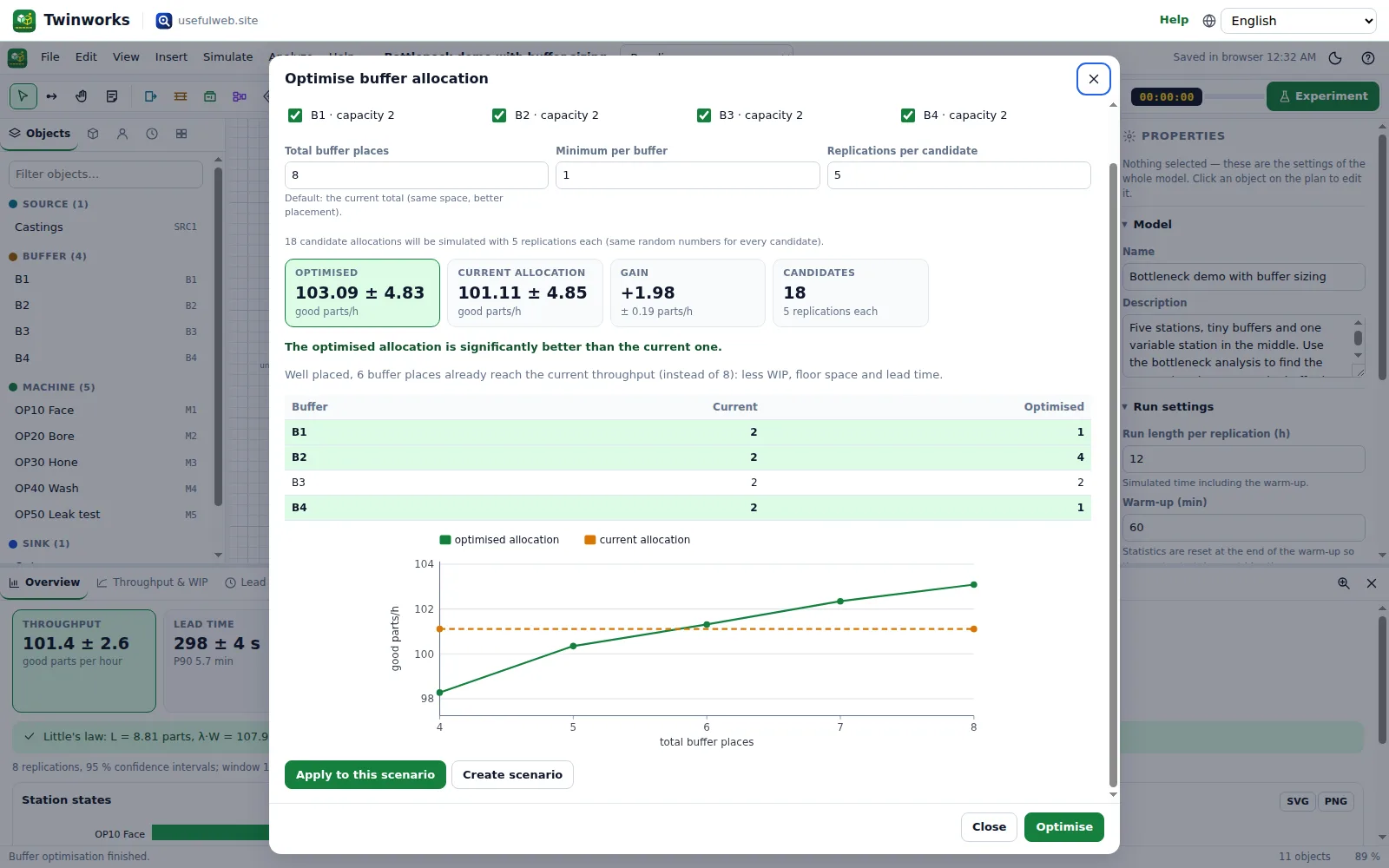
5. De bufferverdeling optimaliseren
{ "template": "bottleneck-buffer-sizing", "total": 8, "replications": 3, "horizonHours": 6 }Stuur dit met POST naar /api/v1/tools/twinworks-buffer-allocation/calculate:
{
  "summary": "8 buffer places: B1=1, B2=4, B3=2, B4=1 gives 97.13 parts/h (current allocation 95.2, significant gain); 6 well-placed places already reach the current throughput.",
  "result": {
    "best": { "capacities": { "B1": 1, "B2": 4, "B3": 2, "B4": 1 } },
    "gain": { "mean": 1.9333, "lo": 1.6465, "hi": 2.2202 },
    "placesForCurrentThroughput": 6,
    "evaluations": 18
  }
}
result.model is het model met de geoptimaliseerde capaciteiten, klaar voor twinworks-simulate. Laat je total weg, dan wordt het huidige aantal plaatsen opnieuw verdeeld. Met buffers (bijv. "B2,B3") beperk je de optimalisatie tot bepaalde buffers.
6. Een lijn balanceren
{
  "tasks": [
    { "id": "A", "time": 60, "predecessors": "" },   { "id": "B", "time": 40, "predecessors": "A" },
    { "id": "C", "time": 55, "predecessors": "B" },  { "id": "D", "time": 50, "predecessors": "A" },
    { "id": "E", "time": 30, "predecessors": "D" },  { "id": "F", "time": 45, "predecessors": "D" },
    { "id": "G", "time": 20, "predecessors": "F" },  { "id": "H", "time": 35, "predecessors": "C,E,G" }
  ],
  "availableMinutes": 450, "demand": 270, "method": "best"
}
→ "4 stations for a takt time of 100 s (theoretical minimum 4), efficiency 83.8%, smoothness index 47.7 s." (4 stations bij een takttijd van 100 s, theoretisch minimum 4, efficiëntie 83,8 %, gladheidsindex 47,7 s) met de stations [A,B], [D,F], [C,E], [G,H]. Het resultaat bevat ook een model van de gebalanceerde lijn dat je direct kunt simuleren.
7. Een wachtrijformule controleren
{ "queue": "mm1", "arrivalsPerHour": 60, "serviceTime": 48, "verify": true, "replications": 10 }→ "M/M/1: utilization 80%, mean wait 192 s, mean queue 3.2; simulation confirms the result." (M/M/1: bezettingsgraad 80 %, gemiddelde wachttijd 192 s, gemiddelde wachtrij 3,2; de simulatie bevestigt het resultaat). Het blok verification bevat de gesimuleerde gemiddelde wachttijd 193.4 s met het 95%-interval [177.2, 209.6], waar de exacte 192 s binnen valt.
8. Gebruik vanuit een AI-agent (MCP)
Voeg het MCP-endpoint https://twinworks.usefulweb.site/mcp toe aan je MCP-client (Claude Desktop, Cursor, …). Toolnamen gebruiken underscores:
{
  "jsonrpc": "2.0", "id": 2, "method": "tools/call",
  "params": {
    "name": "twinworks_bottleneck_analysis",
    "arguments": { "template": "bottleneck-buffer-sizing", "replications": 3 }
  }
}
De response bevat de samenvatting als tekst en daarnaast de volledige JSON in structuredContent. Een goede prompt: "Hier is mijn lijn als Twinworks-JSON. Zoek de bottleneck, varieer daarna de buffer ervoor van 1 tot 8 en vertel me de kleinste grootte die 95 % van de winst oplevert."
Limieten
Een replicatie mag maximaal 6 miljoen events nodig hebben. De API accepteert tot 30 replicaties voor twinworks-simulate en tot 20 per punt voor de analyse- en sweeptools, met looptijden tot 2.400 uur. Voor grotere studies gebruik je de werkruimte (die draait in een Web Worker) of verdeel je het werk over meerdere aanroepen.
Klaar om het te proberen?