ट्यूटोरियल 7 / 12
API / MCP से स्वचालित करो
उन्नत 15 मिनट
Twinworks इंजन को स्क्रिप्ट और AI एजेंट से चलाओ — असली JSON अनुरोधों और जवाबों के साथ मॉडल सिमुलेट करो, बॉटलनेक रैंक करो, बफ़र का स्वीप और ऑप्टिमाइज़ेशन करो, लाइन बैलेंस करो और क्यूइंग फ़ॉर्मूले जाँचो।
वर्कस्पेस का सिमुलेशन इंजन वही TypeScript कोड है जो usefulweb API और MCP सर्वर पर छह टूल चलाता है; सातवाँ टूल, सामग्री परिवहन शेड्यूलर, साझा वाहन, परिवहन शेड्यूल और मॉडल जाँच में समझाया गया है। नतीजे नियतात्मक हैं: एक ही मॉडल और seed से ऐप में और सर्वर पर हमेशा एक जैसे आँकड़े मिलते हैं।
| टूल id (REST) | MCP नाम | यह क्या करता है |
|---|---|---|
twinworks-simulate | twinworks_simulate | मॉडल + रन की अवधि + seed + रेप्लिकेशन → कॉन्फ़िडेंस इंटरवल के साथ KPI, हर स्टेशन के आँकड़े, बॉटलनेक, लागत |
twinworks-bottleneck-analysis | twinworks_bottleneck_analysis | रैंक किए गए बॉटलनेक (active-period विधि) + what-if फ़ायदे + सुझाव |
twinworks-buffer-sweep | twinworks_buffer_sweep | बफ़र साइज़ (या कोई और पैरामीटर) का स्वीप करो → थ्रूपुट कर्व और नी पॉइंट |
twinworks-buffer-allocation | twinworks_buffer_allocation | अधिकतम थ्रूपुट के लिए बफ़र की तय संख्या में जगहें बाँटो (greedy, common random numbers) |
twinworks-line-balance | twinworks_line_balance | टास्क + पूर्वता + takt → स्टेशन असाइनमेंट, दक्षता, smoothness index |
twinworks-queue-formulas | twinworks_queue_formulas | M/M/1, M/M/c, M/D/1, M/G/1, Kingman — चाहो तो सिमुलेशन से सत्यापित |
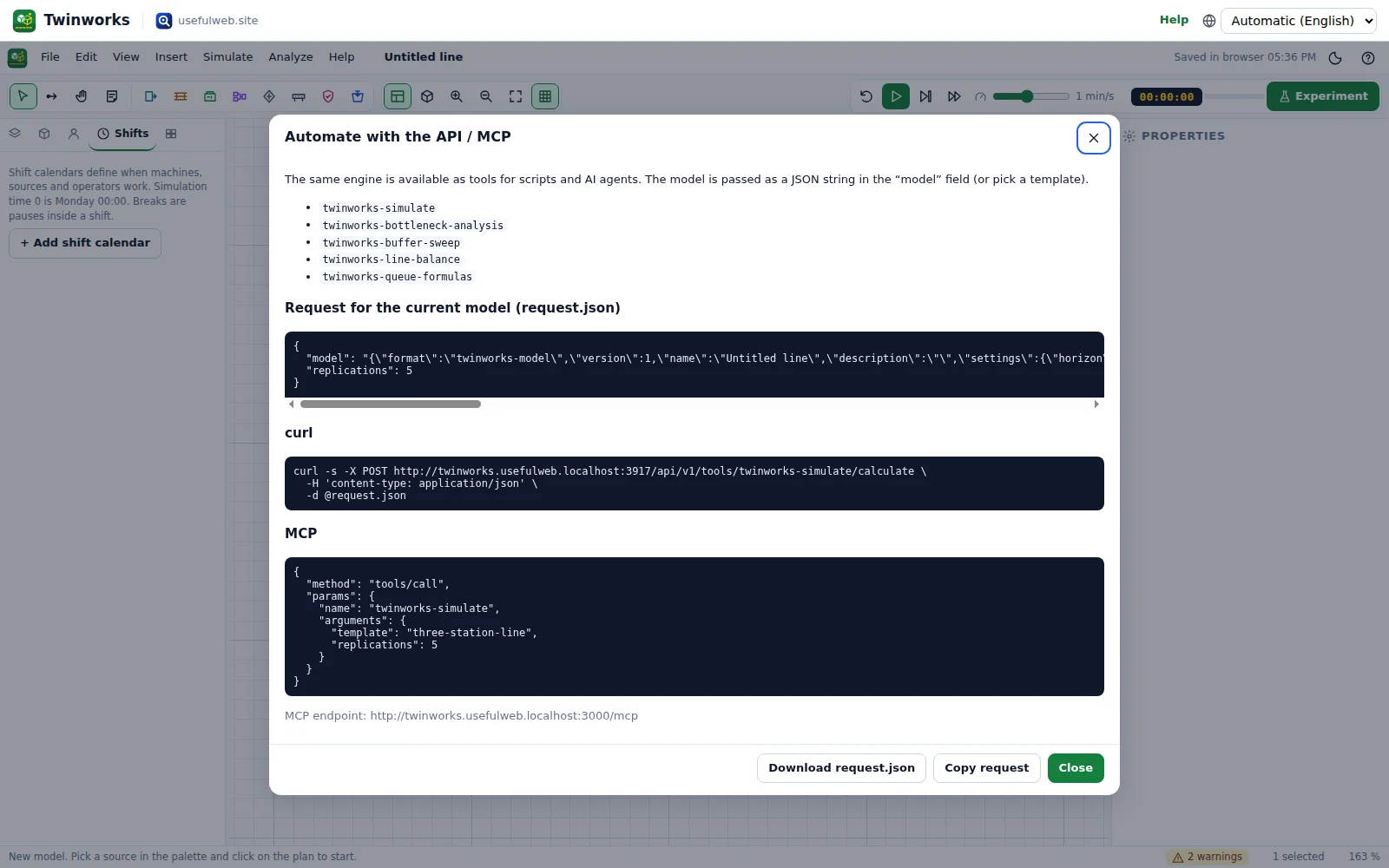
वर्कस्पेस में सहायता → API / MCP से स्वचालित करो तुम्हारे मौजूदा मॉडल के लिए कॉपी करने को तैयार अनुरोध दिखाता है।
1. एक टेम्पलेट सिमुलेट करो
हर मॉडल टूल या तो template id लेता है या model — यानी फ़ाइल → एक्सपोर्ट → मॉडल JSON (सक्रिय परिदृश्य) से मिला JSON, स्ट्रिंग के रूप में भेजा गया।
curl -s -X POST https://twinworks.usefulweb.site/api/v1/tools/twinworks-simulate/calculate \
  -H 'content-type: application/json' \
  -d '{"template":"three-station-line","horizonHours":8,"replications":5,"seed":42}'
जवाब (छोटा किया गया):
{
  "summary": "3-station line: 64.1 ± 3.4 good parts/h (95 % CI, 5 replications), mean lead time 304 s, WIP 5.53; bottleneck: Mill.",
  "result": {
    "replications": 5,
    "seeds": [42, 3029642774, 2605890936, 2032093786, 1137000544],
    "throughputPerHour": { "mean": 64.1333, "lo": 60.7384, "hi": 67.5282, "halfWidth": 3.3949, "n": 5 },
    "little": { "L": 6.8785, "lambdaPerHour": 66.6667, "W": 369.285, "lambdaW": 6.8386, "relError": 0.00581, "ok": true },
    "stations": [
      { "id": "M2", "name": "Mill", "utilization": 0.9126,
        "states": { "busy": 0.9126, "setup": 0, "waitop": 0, "blocked": 0, "idle": 0.0874, "down": 0, "maint": 0, "off": 0 },
        "availability": 1, "performance": 0.903, "quality": 1, "oee": 0.903 }
    ],
    "bottleneck": { "primary": "M2", "ranking": [ { "id": "M2", "name": "Mill", "sole": 0.8252, "shifting": 0.0606, "total": 0.8858 } ] },
    "openInAppUrl": "https://twinworks.usefulweb.site/app#project=…"
  }
}
seeds हर रेप्लिकेशन का seed बताता है, ताकि कोई भी रन ठीक वैसा ही दोहराया जा सके। little पहले रेप्लिकेशन में मापे गए WIP की तुलना थ्रूपुट × लीड टाइम से करता है (Little का नियम) — मॉडल की एक तेज़ जाँच। openInAppUrl मॉडल को वर्कस्पेस में खोलता है।
2. तुम्हारा अपना मॉडल, हाथ से जाँचा हुआ
एक नियतात्मक दो-मशीन लाइन: असीमित सप्लाई, M1 = 30 s, 3 जगहों वाला बफ़र, M2 = 40 s। इसे two-machines.json के रूप में सेव करो:
{
  "name": "Two machines",
  "settings": { "horizon": 7200, "warmup": 600 },
  "nodes": [
    { "id": "S", "type": "source", "arrival": "saturated" },
    { "id": "M1", "type": "machine", "cycle": { "type": "constant", "value": 30 } },
    { "id": "B", "type": "buffer", "capacity": 3 },
    { "id": "M2", "type": "machine", "cycle": { "type": "constant", "value": 40 } },
    { "id": "OUT", "type": "sink" }
  ],
  "links": [ { "from": "S", "to": "M1" }, { "from": "M1", "to": "B" }, { "from": "B", "to": "M2" }, { "from": "M2", "to": "OUT" } ]
}
model फ़ील्ड टेक्स्ट है (JSON एक स्ट्रिंग के रूप में), इसलिए फ़ाइल को jq से एम्बेड किया जाता है:
jq -n --rawfile m two-machines.json '{model: $m, replications: 1}' |
  curl -s -X POST https://twinworks.usefulweb.site/api/v1/tools/twinworks-simulate/calculate \
       -H 'content-type: application/json' --data @-
नतीजा: "summary": "Two machines: 90 good parts/h (single run), mean lead time 240 s, WIP 6; bottleneck: Machine M2." (दो मशीनें: 90 अच्छे पार्ट/घंटा (एकल रन), औसत लीड टाइम 240 s, WIP 6; बॉटलनेक: मशीन M2)
नियतात्मक लाइन के लिए सिद्धांत ठीक यही कहता है: थ्रूपुट = 1 / बॉटलनेक साइकिल टाइम = 3600 / 40 = 90 पार्ट/घंटा। M1 30/40 = 75 % समय व्यस्त रहती है और बाकी 25 % ब्लॉक रहती है, M2 100 % व्यस्त रहती है। Little का नियम बिल्कुल सही बैठता है: L = λ·W = (90 / 3600 s) × 240 s = सिस्टम में 6 पार्ट।
वितरण के प्रकार: constant {value}, uniform {min,max}, triangular {min,mode,max}, normal {mean,sd} (0 पर काटा गया), exponential {mean}, lognormal {mean,sd}। पूरा फ़ॉर्मेट /project.schema.json में है।
3. बॉटलनेक रैंक करो और सुधार परखो
curl -s -X POST https://twinworks.usefulweb.site/api/v1/tools/twinworks-bottleneck-analysis/calculate \
  -H 'content-type: application/json' \
  -d '{"template":"bottleneck-buffer-sizing","replications":3}'
{
"summary": "\"OP30 Hone\" is the main bottleneck (58.3% of the time; best tested fix: Add a parallel server at \"OP30 Hone\" (1 → 2), +7.85 parts/h).",
"result": {
"primary": "M3",
"ranking": [
{ "rank": 1, "id": "M3", "name": "OP30 Hone", "sole": 0.4043, "shifting": 0.1788, "total": 0.5831, "utilization": 0.8477 },
{ "rank": 2, "id": "M2", "name": "OP20 Bore", "sole": 0.2613, "shifting": 0.1628, "total": 0.4241, "utilization": 0.7929 }
],
"recommendations": [ "\"OP30 Hone\" is the bottleneck 58.3% of the time (40.4% sole, 17.9% shifting): …" ]
}
}4. बफ़र का स्वीप करो
{ "template": "bottleneck-buffer-sizing", "target": "B2", "parameter": "capacity", "from": 1, "to": 8, "step": 1, "replications": 4 }इसे /api/v1/tools/twinworks-buffer-sweep/calculate पर POST करो:
{
  "summary": "Throughput ranges from 99.6 to 105.8 parts/h over buffer capacity 1…8 at B2; knee point at 3.",
  "result": {
    "points": [
      { "value": 1, "throughput": { "mean": 99.5682, "lo": 95.1451, "hi": 103.9913 }, "wip": { "mean": 7.9107 }, "bottleneck": "M3" },
      { "value": 2, "throughput": { "mean": 102.4318, "lo": 97.7379, "hi": 107.1257 }, "wip": { "mean": 8.6199 }, "bottleneck": "M3" },
      { "value": 3, "throughput": { "mean": 103.7273, "lo": 99.2019, "hi": 108.2527 }, "wip": { "mean": 9.285 }, "bottleneck": "M3" }
    ]
  }
}
स्वीप के सभी पॉइंट एक जैसे रेप्लिकेशन seed इस्तेमाल करते हैं, इसलिए कर्व स्मूद रहता है और पॉइंट्स के बीच के अंतर सार्थक होते हैं।
5. बफ़र एलोकेशन ऑप्टिमाइज़ करो
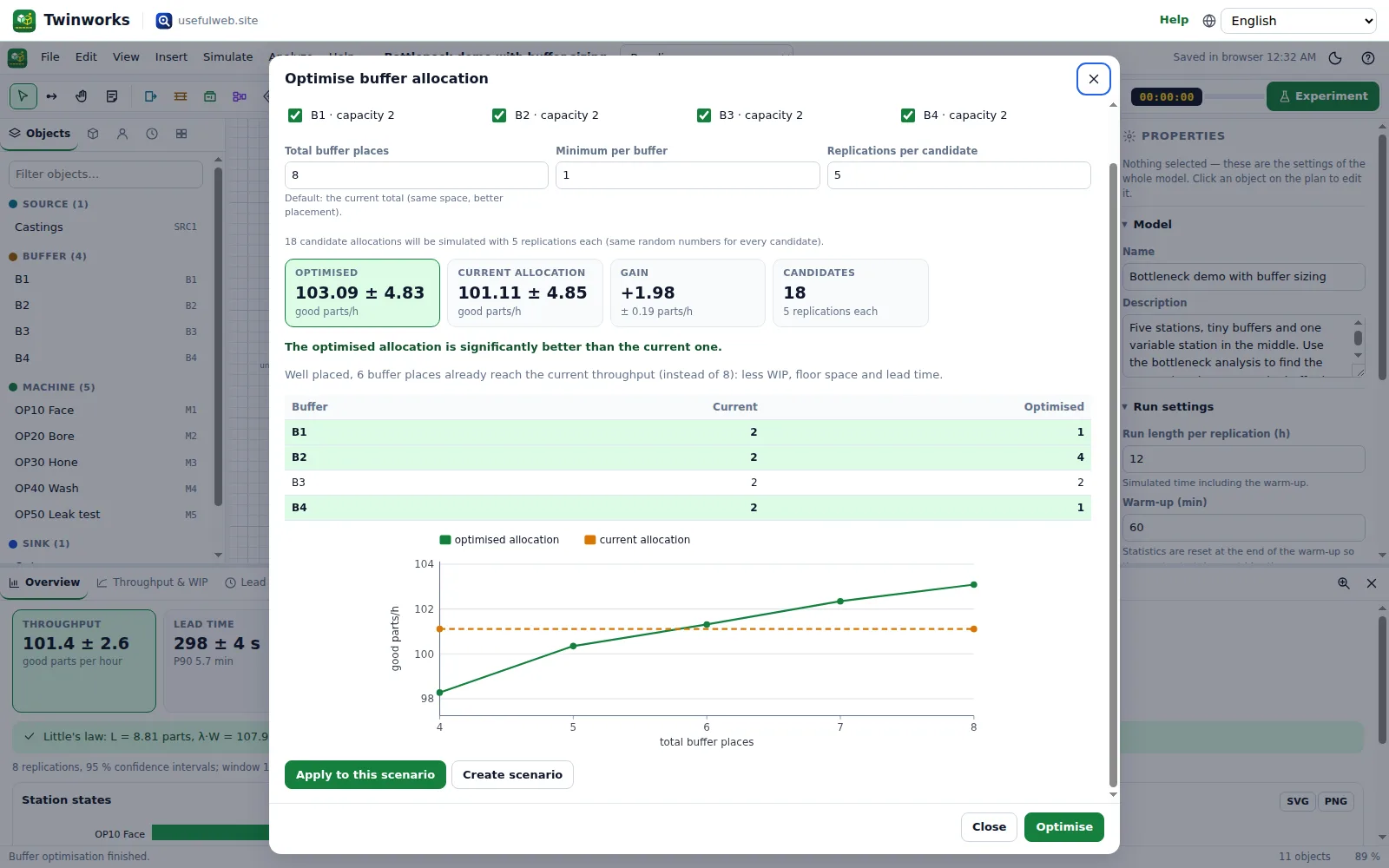
{ "template": "bottleneck-buffer-sizing", "total": 8, "replications": 3, "horizonHours": 6 }इसे /api/v1/tools/twinworks-buffer-allocation/calculate पर POST करो:
{
  "summary": "8 buffer places: B1=1, B2=4, B3=2, B4=1 gives 97.13 parts/h (current allocation 95.2, significant gain); 6 well-placed places already reach the current throughput.",
  "result": {
    "best": { "capacities": { "B1": 1, "B2": 4, "B3": 2, "B4": 1 } },
    "gain": { "mean": 1.9333, "lo": 1.6465, "hi": 2.2202 },
    "placesForCurrentThroughput": 6,
    "evaluations": 18
  }
}
result.model ऑप्टिमाइज़ की गई क्षमताओं वाला मॉडल है, जो twinworks-simulate के लिए तैयार है। मौजूदा जगहों को ही फिर से बाँटने के लिए total छोड़ दो; buffers (जैसे "B2,B3") ऑप्टिमाइज़ेशन को कुछ ही बफ़र तक सीमित करता है।
6. लाइन बैलेंस करो
{
  "tasks": [
    { "id": "A", "time": 60, "predecessors": "" },   { "id": "B", "time": 40, "predecessors": "A" },
    { "id": "C", "time": 55, "predecessors": "B" },  { "id": "D", "time": 50, "predecessors": "A" },
    { "id": "E", "time": 30, "predecessors": "D" },  { "id": "F", "time": 45, "predecessors": "D" },
    { "id": "G", "time": 20, "predecessors": "F" },  { "id": "H", "time": 35, "predecessors": "C,E,G" }
  ],
  "availableMinutes": 450, "demand": 270, "method": "best"
}
→ "4 stations for a takt time of 100 s (theoretical minimum 4), efficiency 83.8%, smoothness index 47.7 s." (100 s के takt time के लिए 4 स्टेशन (सैद्धांतिक न्यूनतम 4), दक्षता 83.8%, smoothness index 47.7 s), स्टेशन [A,B], [D,F], [C,E], [G,H] के साथ। नतीजे में बैलेंस की गई लाइन का सिमुलेशन के लिए तैयार model भी होता है।
7. क्यूइंग फ़ॉर्मूला जाँचो
{ "queue": "mm1", "arrivalsPerHour": 60, "serviceTime": 48, "verify": true, "replications": 10 }→ "M/M/1: utilization 80%, mean wait 192 s, mean queue 3.2; simulation confirms the result." (M/M/1: उपयोग 80%, औसत प्रतीक्षा 192 s, औसत कतार 3.2; सिमुलेशन नतीजे की पुष्टि करता है) verification ब्लॉक में सिमुलेट की गई औसत प्रतीक्षा 193.4 s और 95 % इंटरवल [177.2, 209.6] होता है, जिसमें सटीक 192 s शामिल है।
8. इसे AI एजेंट से इस्तेमाल करो (MCP)
MCP एंडपॉइंट https://twinworks.usefulweb.site/mcp को अपने MCP क्लाइंट (Claude Desktop, Cursor, …) में जोड़ो। टूल के नामों में अंडरस्कोर होते हैं:
{
  "jsonrpc": "2.0", "id": 2, "method": "tools/call",
  "params": {
    "name": "twinworks_bottleneck_analysis",
    "arguments": { "template": "bottleneck-buffer-sizing", "replications": 3 }
  }
}
जवाब में सारांश टेक्स्ट के रूप में और पूरा JSON structuredContent में होता है। एक अच्छा प्रॉम्प्ट: "यह रही मेरी लाइन Twinworks JSON के रूप में। बॉटलनेक ढूँढो, फिर उसके आगे वाले बफ़र का 1 से 8 तक स्वीप करो और मुझे सबसे छोटा साइज़ बताओ जिससे 95 % फ़ायदा मिल जाए।"
सीमाएँ
एक रेप्लिकेशन में ज़्यादा से ज़्यादा 6 मिलियन इवेंट हो सकते हैं। API twinworks-simulate के लिए 30 तक रेप्लिकेशन और विश्लेषण व स्वीप टूल के लिए हर पॉइंट पर 20 तक रेप्लिकेशन स्वीकार करता है, रन की अवधि 2,400 घंटे तक। बड़े अध्ययनों के लिए वर्कस्पेस इस्तेमाल करो (यह Web Worker में चलता है) या काम को कई कॉल में बाँट दो।
आज़माने के लिए तैयार?